
 alvaSketcher
 alvaMolecule
 alvaDesc
 alvaModel
 alvaRunner
 alvaBuilder

Build, Compare, and Deploy QSAR/QSPR Models
AlvaModel is a powerful, user-friendly software for training, evaluating, and applying predictive models for chemical data. Supporting both regression and classification tasks, it is designed to help you gain insights from molecular descriptors, structural patterns and fingerprints through an intuitive and flexible interface.

Why Use alvaModel?
All-in-One Modeling Solution: Perform dataset preparation, feature selection, model generation, evaluation, and prediction in one streamlined tool.
Wide Range of Algorithms: Supports multiple modeling techniques including OLS, PLS, LDA, SVM, KNN, Decision Trees, Random Forests, and Consensus models.
Robust Feature Selection: Includes manual selection, correlation filters, and Genetic Algorithm-based selection workflows.
Visual Evaluation Tools: Analyze model performance with ROC and Precision-Recall curves, radar plots, confidence intervals, histograms, and Williams plots.
Intuitive Interface: Easily navigate datasets and models, edit model settings in batch, and explore predictions at the molecule level.
Applicability Domain: Includes leverage-based and bounding box methods to define where predictions are reliable.
Model Building
Using alvaModel with a simple step-by-step procedure, you can create QSAR/QSPR regression and classification models using the descriptors, structural patterns and fingerprints previously calculated in alvaDesc.
Regression model
- Ordinary Least Squares (OLS)
- Partial Least Squares (PLS)
- KNN regression
- Support Vector Machine (SVM)
- Decision Tree
- Random Forest
- Consensus
Classification models
- Linear and Quadratic Discriminant Analysis (LDA/QDA)
- Partial Least Squares Discriminant Analysis (PLS-DA)
- KNN classification
- Support Vector Machine (SVM)
- Decision Tree
- Random Forest
- Consensus
Feature Selection Tools
With alvaModel, you can build models by manually selecting the algorithm and descriptors, which is ideal when replicating existing models or applying known configurations.
However, since alvaDesc projects can contain thousands of descriptors (up to 5000), alvaModel also supports automatic feature selection using Genetic Algorithms (GA). This allows the software to explore combinations of features and identify those that yield the best models according to user-defined scoring metrics, such as R², Q², or RMSE.
To reduce complexity and improve model reliability, several feature reduction techniques are available. You can remove descriptors with constant or near-constant values, filter out those with low standard deviation, or exclude highly correlated features based on pairwise correlation thresholds.
Model Evaluation
A comprehensive set of performance metrics is available in alvaModel to assess both regression and classification models. These include R², RMSE, MAE (for regression), and Accuracy, Precision, Recall, F1 score, MCC, AUROC, and Cohen’s Kappa (for classification).
For each model, scores can be calculated on the training set, test set, or through cross-validation, helping to assess both predictive accuracy and model generalization.
A wide range of visual tools to support detailed model evaluation are available.
Regression models
- Scatter plot of experimental vs. predicted values
- Residual plot
- Williams plot (when using descriptors)
- Beta bars plot (for OLS and PLS models)
- Histograms of predicted, experimental, residual values, and descriptor distributions
Classification models
- ROC curve
- Precision–Recall curve
- Confusion matrix with color-coded cells for quick interpretation
- Histograms of predicted and experimental values
To compare multiple models, alvaModel provides a dedicated interface combining a sortable grid and interactive charts.

The grid displays all key model information like type, descriptors, datasets, scores and highlights best and worst performing metrics. It also allows for editing, filtering, and bulk operations.
The Simultaneous Confidence Interval Plot displays performance metrics with 95% confidence intervals, making it easy to detect statistically significant differences.
The Radar Plot provides a multi-metric overview, particularly useful for classification tasks where metrics like sensitivity, specificity, and F1 may behave differently.
Applicability Domain
The model’s Applicability Domain (AD) can be estimated by measuring the similarity between the molecules in the training dataset and those being evaluated. An in/out indication shows whether a molecule lies inside or outside the defined domain of reliability. AlvaModel provides several Applicability Domain estimation methods, including Distance-based (e.g., average distance), Leverage (based on the Hat Matrix), and Bounding Box approaches. The AD status is visually integrated into both plots and prediction tables, allowing you to immediately identify molecules outside the model’s reliable prediction space.
Prediction Analysis
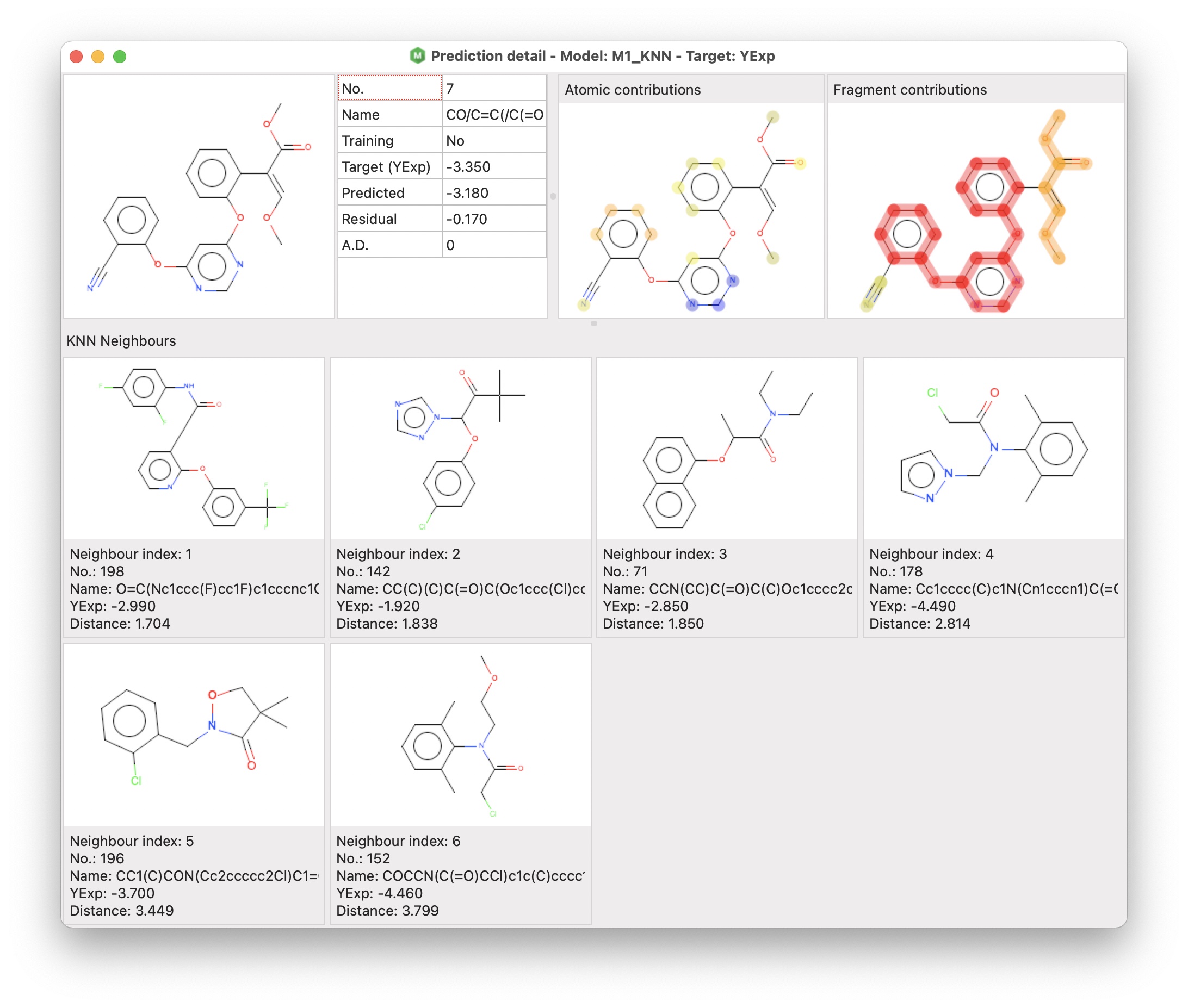
To analyse a single prediction, alvaModel provides a functionality called prediction detail.
The prediction detail includes three different sections:
- the target molecule and a grid including some information about the prediction
- atomic and fragment contributions (for all regression models except the consensus ones)
- K nearest neighbours (for KNN models)
The atomic and fragment contributions are two visual representations of the contribution of atoms for the Atomic contributions, and framework and side chains for the Fragment contributions
Build and Deploy
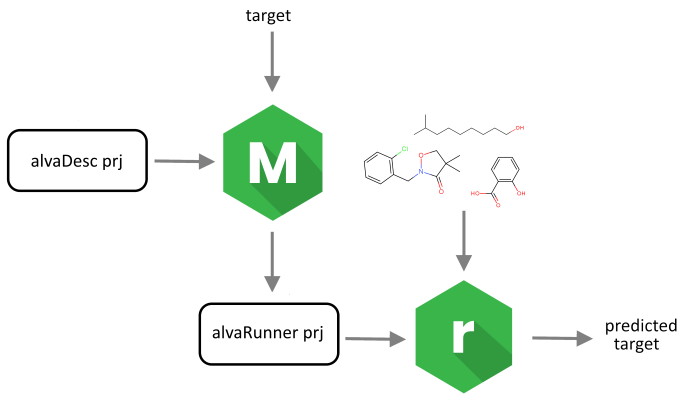
Alvascience’s solution to build and deploy QSAR/QSPR regression and classification models consists of two pieces of software: alvaModel and alvaRunner. The latter is a software tool that allows you to apply the models, created using alvaModel, on a new set of molecules without the need of any other software tool.
Using alvaModel you can apply models directly to external datasets, but you can also export the selected models as an alvaRunner project, it allows you to deploy your models to other parties (e.g., if you want to make them available to prove their reproducibility) or to use models created by others (e.g., if you want to test a model described in a scientific paper).
With alvaModel, you can apply models directly to external datasets or export them as alvaRunner projects. This allows you to share your models with collaborators, or to use models developed by others, such as those described in scientific publications.
Video
A short video introduction:
Example
A few example models were prepared using alvaModel and they can be applied to your molecules by using alvaRunner.
Platforms
The software is 64bit and it’s available for Windows, Linux and macOS.
How to Cite
If you reference alvaModel in an academic paper or publication, you can find the correct citation for your version by selecting “About alvaModel” from its menu.
Additionally, please consider citing the following paper:
- Mauri, A., & Bertola, M. (2022). Alvascience: A New Software Suite for the QSAR Workflow Applied to the Blood–Brain Barrier Permeability. International Journal of Molecular Sciences, 23(21), 12882. https://doi.org/10.3390/ijms232112882
Related Tools
- A key input of the software is a project created using alvaDesc
- The models can be exported in a project which can be applied on a new set of molecules using alvaRunner
- alvaRunner can be integrated with KNIME using alvaRunner Plugin
- A tutorial showing how to build a QSAR model using Alvascience tools